OpenStation Blog: What WordPress would have looked like in 1995
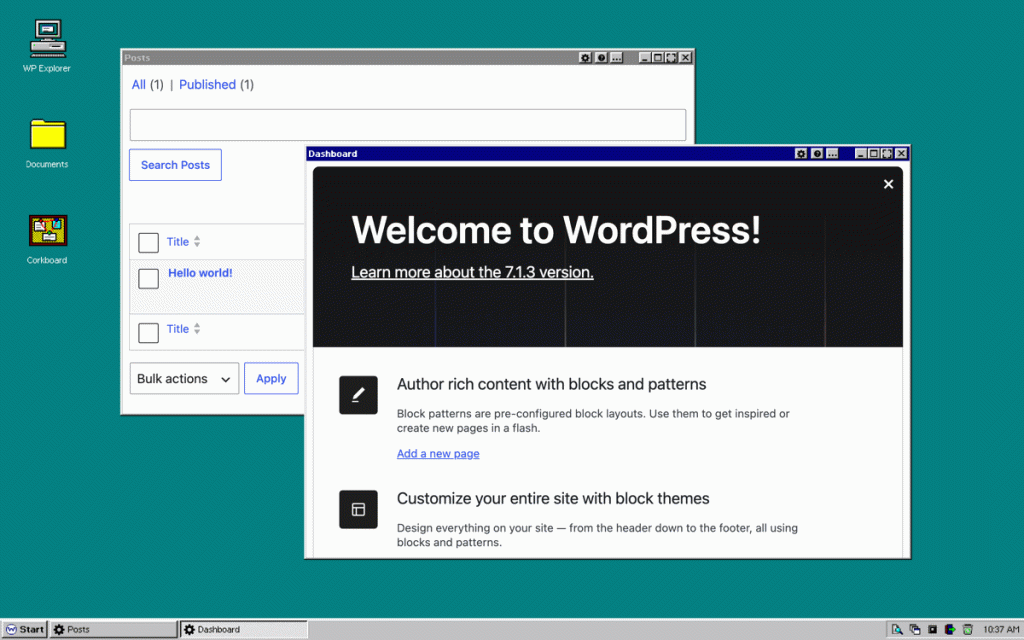
I’ve been wondering how far a theme can take OpenStation. Not just a wallpaper and a different color, but everything: windows, dock, menus, fonts, icons, layouts, etc. So I tried to make wp-admin look like two operating systems from a long time ago.

Retro 95 reimagines wp-admin as Windows 95. It even comes with a Start menu! And the classic clock sitting in the bottom-right corner is also there. You can try it live.

Retro 84 is the counterpart for Apple fans. It turns wp-admin into the first graphical OS that many people ever saw: the original Macintosh’s System 1. The beloved monochrome display, the classic pixelated font, and more! Check out the live demo.

And here’s a fun fact: every icon is pixel art typed into a text file, one character per pixel. The fonts were also made the same way, letter by letter.

Underneath, it’s the same wp-admin as always, just a few decades older.
If you want to build your own theme, the docs list everything a theme can change. Maybe it’s time for a proper Windows Vista comeback.